How Does This Workshop Work?
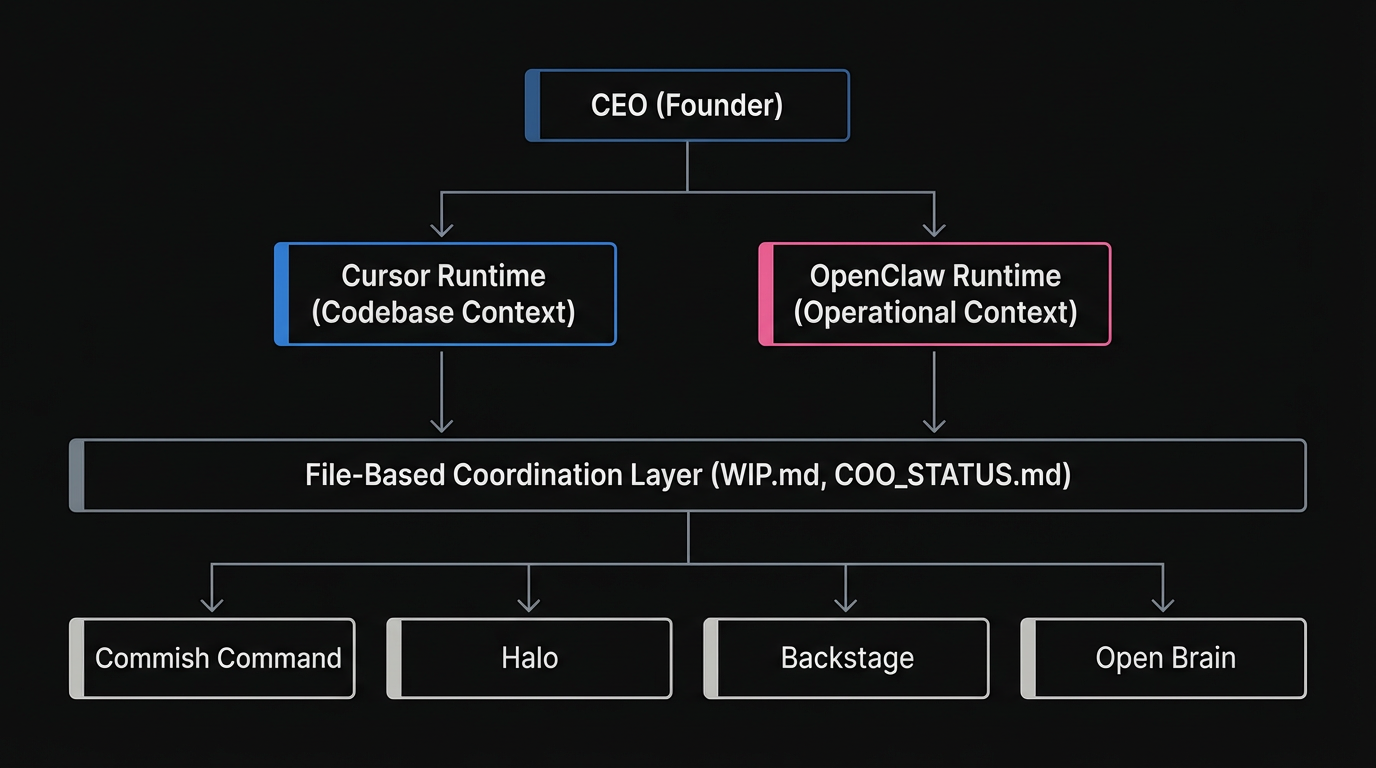
Most people tinker alone. I tinker with a team of AI agents. Each project gets its own crew — coordinated by me and an AI COO named Jared who crashes every 24 hours.
Each project in my portfolio gets its own team of agents with specialized roles: lead engineer, product manager, security specialist, marketing, and more. The COO coordinates across all projects, propagating patterns and routing issues to the right agent.
💡 How to Steal This
Stop treating AI as a generic assistant. Create specific agent personas in your .cursor/rules/ directory. Give them a name, a narrow scope, and a specific checklist. A security agent shouldn't write feature code.
The Orchestrator Evolution
Early on, I assumed my founder agent should be a dispatcher — routing tasks to specialist agents. Then one agent pushed back and taught me why that was wrong.
Context density beats delegation for product code. A specialist agent spun up on a fresh branch needs to rediscover the database schema, component hierarchy, and project conventions — all context the founder agent already holds. The transfer cost exceeds the parallelism benefit.
Now every MonkeyRun project uses the builder-who-triages model: lead agents like Atlas (Halo) and Hopper (Commish Command) build code themselves and only delegate truly independent surfaces — marketing, security audits, research. They don't dispatch; they build, and they triage what to build next.
This pattern is now codified as orchestrator rules (*-orchestrator.mdc) rolled out portfolio-wide. Each project's lead agent has a scoped rule file that defines their triage protocol, delegation criteria, and session startup sequence.
- Work is on an independent surface
- The agent has a well-scoped prompt
- The work doesn't need architectural context
- The task is describable in 3-5 sentences
Only when all four criteria are met does the lead agent delegate. Everything else, they build themselves.
Deep Dive: Agent Orchestration
Interactive visual guide to the builder-who-triages model, the delegation test, session protocols, and the full orchestration flow.
Explore the interactive guide →The Multi-Runtime Model
Product management and code building need different contexts. Builders need the codebase. PMs need the market. Putting both in the same context window wastes tokens on the wrong thing.
MonkeyRun now runs on three runtimes, each with a different context profile:
- Cursor — codebase-context work: building features, fixing bugs, writing content. Rules auto-load from
.cursor/rules/. The standard for all lead engineer agents. - OpenClaw — operational and market-context work: PM engine, competitive scans, COO coordination, cron scheduling. PM work runs here so builders aren't paying token cost for market research.
- Claude Code (Claude Desktop) — an active third runtime used for tasks where portability matters more than codebase-rule auto-loading. Key tradeoffs vs. Cursor: no auto-loading of
.cursor/rules/, but has auto-memory via~/.claude/that persists across machines. Works on any machine with just agit clone— no IDE configuration required. Dr. Brian and the Open Brain MCP server were built here.
The builder reads PM output at session startup — informed without spending a single token on research.
💡 How to Steal This
Split your workflows. Keep Cursor for codebase tasks where you need file context. Use Claude Code or OpenClaw for market research, planning, or cross-project coordination where codebase context is just noise.
The Async PM Engine
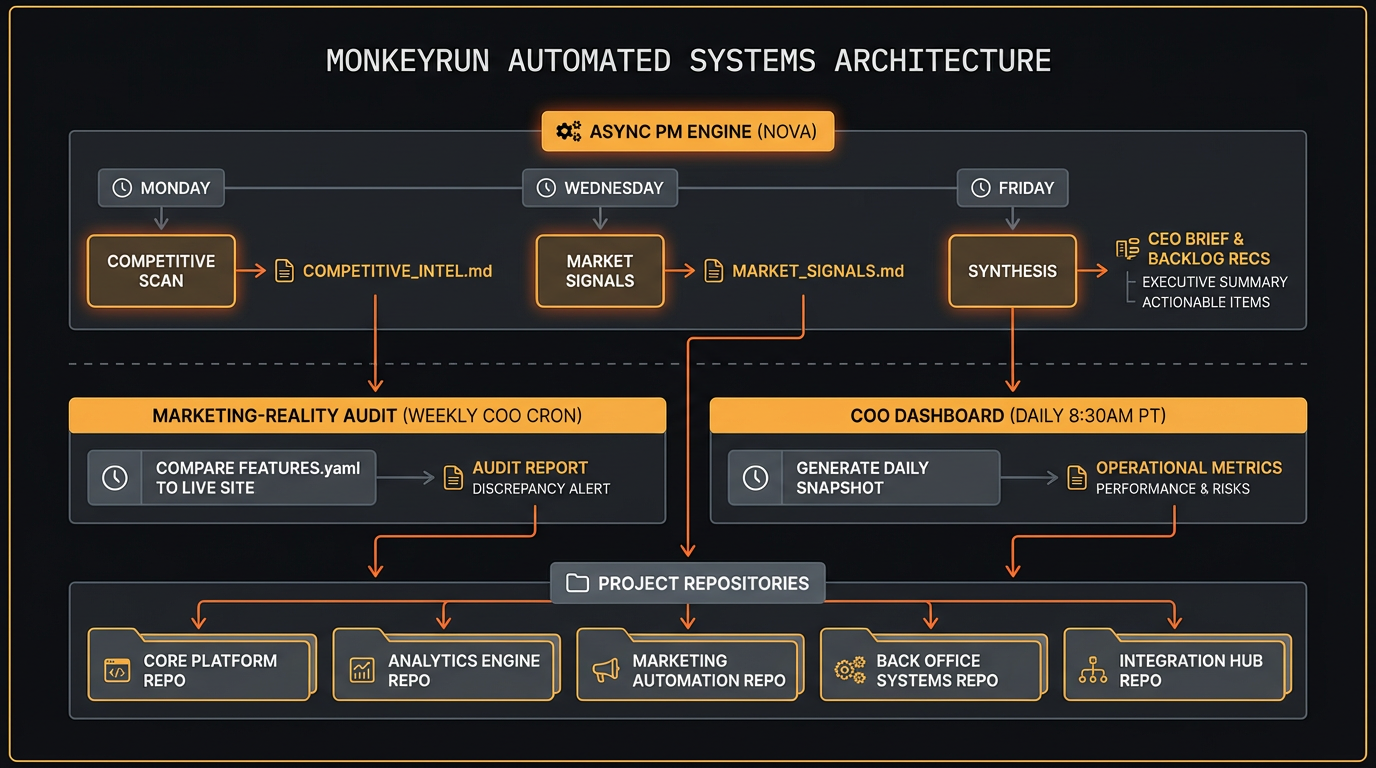
Nova runs the async PM engine on a weekly rhythm: competitive scans on Monday, market signals on Wednesday, strategy synthesis on Friday. The cron schedule is strict by design — each run has a defined output and a defined consumer.
Here's how the output feeds back into the repos:
- Monday (competitive scan) — Nova writes
docs/product/pm-engine/COMPETITIVE_INTEL.md. The lead engineer agent reads this at session startup to calibrate what to build vs. what to deprioritize. - Wednesday (market signals) — Nova writes
docs/product/pm-engine/MARKET_SIGNALS.md. Captures user feedback patterns, search trends, and competitive movement. - Friday (synthesis) — Nova writes three files: a CEO brief, a marketing brief, and backlog recommendations to
docs/product/pm-engine/. The COO reads the CEO brief and routes the backlog recommendations into each project'sWIP.mdfor the following week.
The PM engine also powers a marketing-reality audit — a weekly COO cron (Friday 10am) that compares FEATURES.yaml against the live marketing site, flagging oversells, undersells, and roadmap drift before users notice.
Deep Dive: The PM Engine
Interactive visual guide to the async PM engine — weekly rhythms, stage-aware intelligence, the handoff chain, and what's automated vs. what stays human.
Explore the interactive guide →The Agent Model
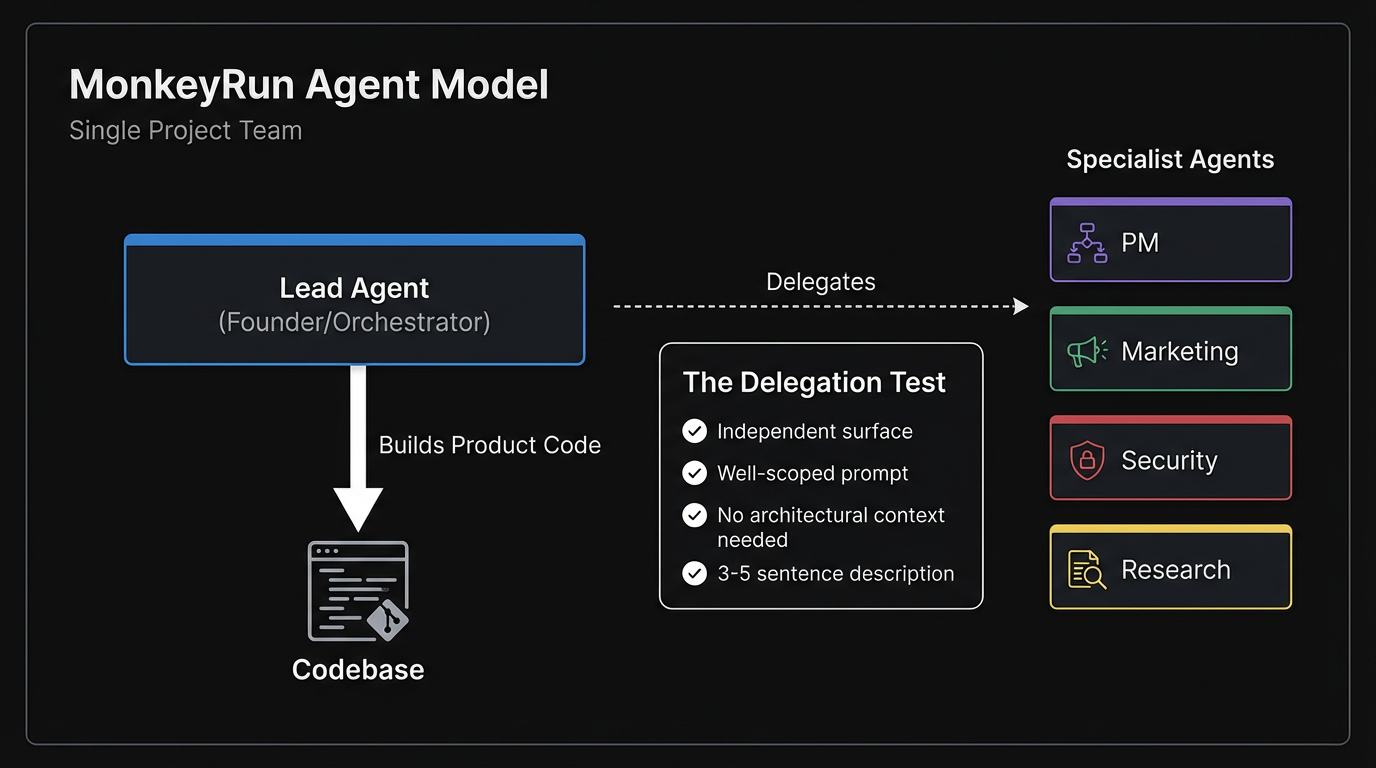
Every agent is a Cursor AI session with a scoped .cursor/rules/ file that defines their role, responsibilities, and checklist. When I say “You are Alex,” the security specialist's full audit checklist auto-loads.
Key principles:
- Named roles, not generic assistants. Each agent has a name, personality, and narrow scope. A security agent doesn't write features. A marketing agent doesn't touch the backend.
- File-based coordination. Agents communicate through standardized markdown files:
COO_STATUS.md,WIP.md,PATTERNS.md,FEATURES.yaml,BRIEFING-*.md,COMPETITIVE_INTEL.md, andMARKET_SIGNALS.md. No clipboard, no chat history. - Lean teams. Start with 3-5 agents per project. Add specialists only when the bottleneck is clearly “not enough agents” rather than “not enough users.”
- Pattern propagation. When one project discovers something useful, the COO propagates it to all other projects via
PATTERNS.md. - HWW-1.5 standard. The “How We Work” standard defines the shared operating model:
.agents/prompt-as-code structure,FEATURES.yamlas the contract between what's built and what's marketed, quality gates, and TDD protocol.
Read how I replaced Jira with flat files →
💡 How to Steal This
Ditch your SaaS project management tools for AI agents. Use markdown files (WIP.md, FEATURES.yaml) committed directly to your repo. Agents can read and write files natively; they struggle to authenticate and paginate through Jira APIs.
The Coordination Layer
The COO (Jared) is an OpenClaw agent that runs 24/7 on dedicated local orchestration hardware. He monitors all projects, checks status files, and routes issues. When he crashes (which happens every ~24 hours due to context overflow), Dr. Crawford diagnoses and resets him.
The coordination system is more than a single cron job. It now includes:
- Pattern propagation cron — every 3 minutes, monitoring operational files across all projects
- PM engine crons — Mon/Wed/Fri, competitive scan → market signals → synthesis
- Marketing-reality audit — weekly, comparing FEATURES.yaml against live marketing sites
- COO Dashboard generation — daily at 8:30am PT, cross-project health view deployed to GitHub Pages (encrypted, password-protected)
Persistent Memory (Open Brain)
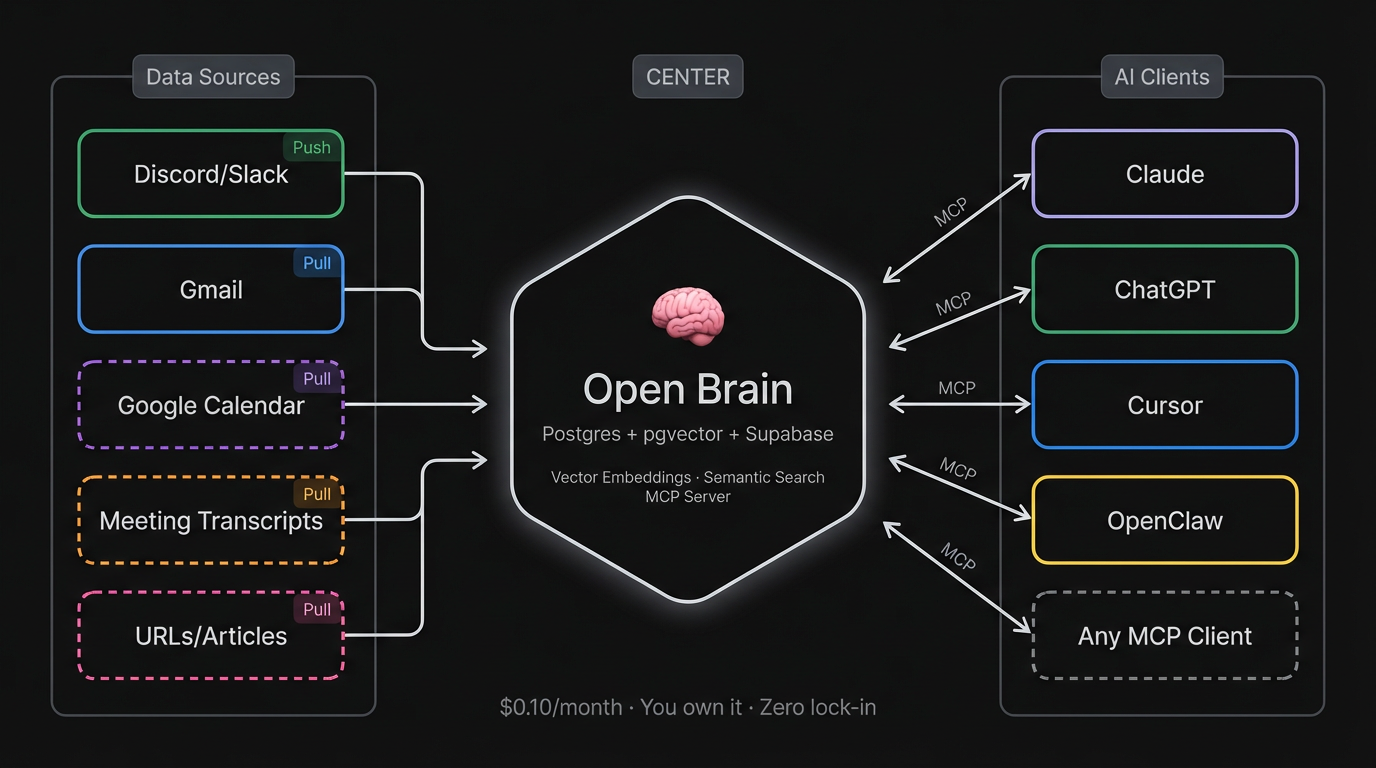
Every AI session starts from zero. To fix this, MonkeyRun uses a persistent AI memory layer built on Nate B. Jones's Open Brain architecture.
It's a self-hosted system (Postgres + pgvector + Supabase) that connects to all my AI clients via MCP (Claude Code, Cursor, ChatGPT, OpenClaw). I capture thoughts manually via a Discord #capture channel (push), and automatically via a Gmail pipeline that chunks and ingests sent email (pull). The entire system is managed by Dr. Brian, my Knowledge Architect agent.
When an agent starts a session, it doesn't just read the codebase — it can semantically search my past emails, decisions, and strategic thinking. The agent's memory extends beyond the repo.
Read the Open Brain build story →
Cross-Machine Portability
The MonkeyRun stack is designed so that any agent, on any machine, can clone a repo and be operational within minutes. This isn't accidental — it's an explicit architectural goal.
Key design decisions that make portability work:
- State lives in files, not sessions. All operational context (
COO_STATUS.md,WIP.md,FEATURES.yaml,PATTERNS.md) is committed to the repo. An agent on a new machine picks up where the last one left off. - Rules are repo-local. Agent prompt rules live in
.cursor/rules/(or.agents/), versioned alongside code. No external config required. - OpenClaw workspace is self-contained. Agent identity, memory, and tools travel with the workspace directory. A fresh clone +
openclaw startis the full setup. - Claude Code extends this further. With persistent memory in
~/.claude/, an agent session can resume context on a different machine without any IDE configuration.
The result: no single machine is a single point of failure. When Jared crashes, the next session inherits full context from the state files. When I switch machines, the agents don't notice.
The WIP Visibility Protocol
One of the hardest problems in multi-agent workflows is knowing what's actually in progress. Without explicit signaling, agents duplicate work, miss blockers, or build on stale state.
The WIP Visibility Protocol solves this with a simple convention: every active task lives in a WIP.md file at the repo root, updated by the working agent before ending any session. The file tracks:
- What's in progress (and who owns it)
- What's blocked and why
- What the next agent should do first
Critically, placement enforces compliance. The WIP.md read instruction sits at the top of every agent's onboarding rules — not buried in a section they'll skim. Agents read the first thing they see. The most important instruction must be the first instruction.
This pattern was discovered the hard way when agents repeatedly started new work without checking existing WIP, causing rework and merge conflicts.
The Portfolio
Current MonkeyRun projects:
- Commish Command — Fantasy football commissioner dashboard (v2.0, production — shipped awards + what-if schedule)
- Halo — Investment portfolio dashboard (v0.1, MVP code complete — pre-deploy hardening, 4 security findings pending)
- Backstage — This site. Documenting the whole operation.
- Open Brain — Persistent AI memory layer (Postgres + pgvector + MCP)
- Dr. Crawford's Office — Diagnostic tool for keeping Jared alive
Plus additional AI and agent projects in various stages — all following the same structure, coordination model, and agent architecture.
Why Document It?
Because nobody else is documenting this at this level of transparency. There are plenty of blog posts about “using AI for coding.” There are very few honest accounts of what happens when you give AI agents real jobs — including the parts where your COO crashes three times in three days and your PM writes specs longer than the implementation.
I'm now at the point where I have automated systems checking my own marketing claims against reality every week. The marketing-reality audit compares what I say I've built (FEATURES.yaml) against what's actually live — flagging oversells before users do. That's the level of operational honesty I'm going for.
I document the wins, the failures, and the patterns. If you're tinkering with AI agents, my mistakes can save you time.